
Activity Launcher
Screenshots
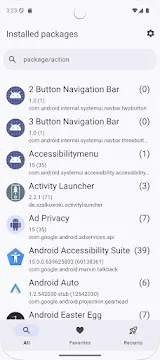
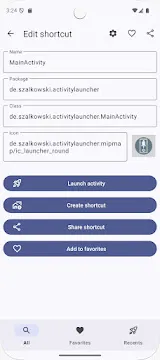
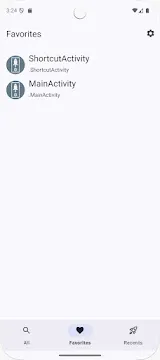
Activity Launcher provides a technical gateway for users who want to explore the hidden depths of their mobile operating system. Most people only interact with the icons visible on their home screens or app drawers. However, every application consists of multiple “activities” or sub-components that perform specific tasks. This tool allows you to see and launch these individual components directly. You can find hidden settings, test experimental features, or create shortcuts to specific pages within an app that are normally hard to reach. It offers a level of control that standard interfaces simply do not provide. Because the application remains lightweight and straightforward, it appeals to both power users and curious enthusiasts. By using this software, you gain a deeper understanding of how your device functions beneath the surface.
Understanding the Core Function of Activity Launcher
The primary purpose of this tool involves listing every hidden entry point within your installed applications. An “activity” represents a single screen or a specific function within an app. For example, a settings app might have separate activities for Wi-Fi, battery, and display. While the main settings menu is easy to find, some manufacturers hide specific sub-menus from the general public.
This application scans your entire system to reveal these buried options. You can use a search bar to find specific keywords like “test” or “debug.” Once you locate a hidden activity, you can launch it with a single tap. This capability allows you to access features that might still be in development or restricted to certain regions. It turns your mobile device into a more flexible tool by removing the limitations imposed by standard launchers.
Why Users Choose Activity Launcher for Customization
Personalization is a major reason why people look for advanced system tools. Standard software often forces you to follow a specific path to change a setting. This utility allows you to bypass those paths entirely. You can create custom home screen shortcuts for specific tasks that usually require several clicks.
- Direct Access: Create a shortcut for a specific system update page or hidden network configuration.
- Feature Discovery: Find hidden menus added by manufacturers for internal testing purposes.
- Workflow Efficiency: Reduce the time spent navigating through complex app menus by launching the exact page you need.
By organizing your device this way, you make your daily interactions much faster. You no longer have to dig through layers of menus to reach a buried feature. The app provides a clean list of everything your system can do, giving you the power to reorganize your mobile experience according to your own needs.
Exploring Hidden System Settings with Activity Launcher
Many mobile manufacturers include “Easter eggs” or secret diagnostic menus in their software. These menus are often used by technicians to calibrate screens or test sensors. This application gives you a safe way to explore these technical areas. You can check your battery health with more detail or view advanced hardware information that is usually hidden from view.
Furthermore, some apps include “hidden” modes that can be unlocked by launching the correct activity. For instance, a camera app might have a hidden manual mode that isn’t visible in the main settings. By searching through the activity list, you can activate these professional tools without needing to root your device. This exploration adds significant value to the hardware you already own by unlocking its full potential.
Troubleshooting and Debugging Benefits
Developers and tech-savvy individuals often use this utility to fix software issues. If an app is crashing, you can try launching its sub-components individually to find the source of the problem. You can also use it to clear the cache of a specific activity or reset its preferences if it stops working correctly.
- Component Testing: Launch specific parts of an app to see if they function independently.
- Log Access: Find activities that display system logs or error reports for better troubleshooting.
- Permission Management: Locate hidden permission screens that allow for more granular control over your data.
Using the tool in this manner helps you maintain a healthy system. Instead of performing a full factory reset when an app acts up, you can perform targeted fixes. This saves time and prevents data loss. It provides a surgical approach to mobile maintenance that is far more efficient than standard methods.
Safety and Risks When Using Activity Launcher
While the tool is incredibly powerful, users must exercise caution. Launching a hidden system activity can sometimes lead to unexpected behavior if you change the wrong setting. It is important to know what a specific component does before you start making changes to your device’s core configuration.
The application itself does not require special permissions like root access for most tasks. However, it can reveal menus that have the power to format storage or disable security features. Always pay attention to the names and descriptions of the activities you explore. If a menu looks like it is intended only for factory technicians, proceed with care. Proper research into specific activity names can prevent you from accidentally making your system unstable.
The Simplicity of the User Interface
Despite its technical capabilities, the design of the application is remarkably simple. It uses a minimalist list view that categorizes activities under their parent applications. You can expand or collapse these categories to keep your view organized. The search function is fast and updates in real-time as you type, which is essential when dealing with thousands of potential entries.
The app also allows you to mark certain activities as favorites. This ensures that your most-used hidden menus are always at the top of the list. You can also edit the name and icon of the shortcuts you create on your home screen. This level of aesthetic control ensures that your custom shortcuts blend in perfectly with the rest of your app icons. It proves that a tool does not need to be complicated to be extremely effective.
Conclusion
Activity Launcher acts as a powerful bridge between the average user and the deep technical layers of their mobile system. It provides the freedom to explore hidden menus, unlock experimental features, and create efficient shortcuts. By revealing the individual components of every application, it removes the restrictions found in standard user interfaces. Whether you are a developer looking for a debugging tool or a casual user trying to find a hidden setting, this software offers immense value. It respects your intelligence by giving you direct access to the functions of your device. Use it to simplify your workflow, troubleshoot issues, and discover everything your phone is truly capable of doing.







